AI Business Card Designer by PlasticCard.nz
A free, no-login AI studio that generates print-ready front-and-back business card concepts at real card geometry for New Zealand
Are you the maker? Claim this listing to keep info, pricing and screenshots current. Verified via your tool's domain email.
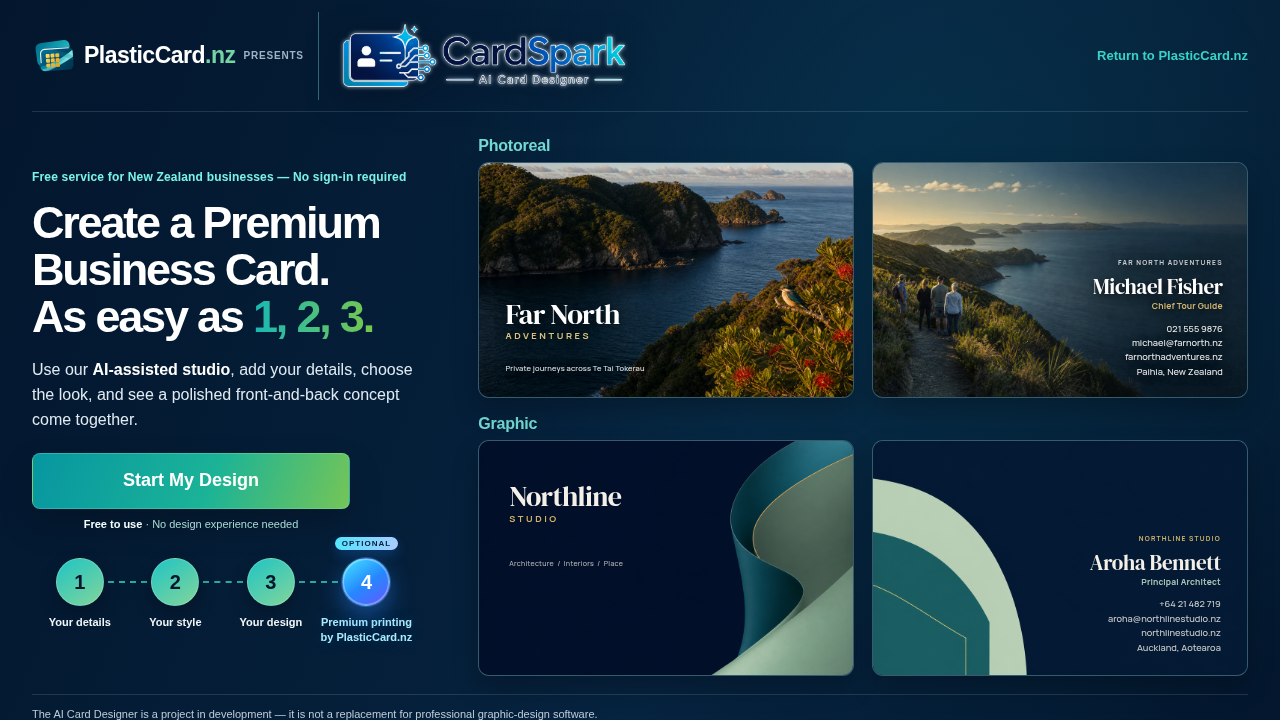
Best suited to New Zealand small-business owners who want a fast, zero-cost starting point for a plastic or paper business card without touching design software. The hard cap of three lifetime generations and the inability to edit output inside the tool make it a concept-starter, not a finished design workflow. If you need unlimited iterations, real template control, or a tool that works beyond NZ, Canva is the obvious alternative.
What is AI Business Card Designer by PlasticCard.nz?
Type your exact card details, choose which side each one goes on and describe the look you want. The AI studio then generates a front-and-back business card concept at real card geometry (86 × 54 mm trim, with bleed), and you can download proof or print files. It's free, needs no sign-in, gives three generations, and suits plastic or paper business cards.
How we scored AI Business Card Designer by PlasticCard.nz
Ease of use is the tool's genuine strength: zero friction onboarding, no account, real print geometry baked in, and a clear four-step flow earn a high sub-score there. Value is moderate rather than high because the free price is offset by the hard 3-generation cap, which is a meaningful constraint for a free tool. Capability scores low because the tool cannot be iterated on inside the browser, has no template library, produces no editable layers, and is explicitly described by its own creators as not a replacement for design software; Canva, a named competitor, offers all of those things at the same price point. Delivery lands in the single digits because the tool self-declares as 'a project in development,' no independent user reviews were found to validate output quality, the post-generation edit workflow depends entirely on emailing a human team rather than any in-tool capability, and the generation cap means a user who gets three poor outputs has no self-serve recovery path.
Pros and cons
What we liked
- Genuinely free with no sign-in: no account, no credit card, no watermark on downloads, and no hidden paywall before you reach the output.
- Generates artwork calibrated to real print geometry (86 x 54 mm trim, 90 x 58 mm bleed) from a plain-text prompt, removing the need to understand bleed, safe zones, or resolution settings.
- Separate front and back directional prompts let you control where quiet text zones appear on each side, a level of compositional intent most free card tools do not offer.
Where it falls short
- Hard cap of 3 total generations per session with no way to purchase more or reset inside the tool: if all three outputs miss the mark, the only path forward is emailing the PlasticCard.nz team, which breaks any self-serve workflow.
- Generated cards are not editable in the browser at all; font, colour, and layout changes require downloading the file and requesting manual edits from PlasticCard.nz staff by email, making independent iteration impossible.
- The tool is explicitly positioned as a service for New Zealand businesses, and the optional printing step only makes sense for NZ-based customers, limiting its practical value for anyone outside that geography.
Key features
AI Business Card Designer by PlasticCard.nz pricing
Completely free to use with no sign-in required. Users receive 3 AI generations total. There is no paid upgrade tier for the designer itself; the only paid step is optional physical card printing through PlasticCard.nz.
| Plan | Price | Who it is for |
|---|---|---|
| Free | Free | 3 AI card generations per session, front-and-back output at real print geometry (86 x 54 mm trim, 90 x 58 mm bleed), downloadable proof and print files, no sign-in required. No paid upgrade tier exists for the designer itself. |
Pricing reflects what we saw at time of review (2026-11). Always confirm current pricing on the tool's own site.
Who should use AI Business Card Designer by PlasticCard.nz?
A sole trader or small-business owner in New Zealand who has never opened design software and needs a business card concept before a print order is the clearest fit. The tool removes every barrier: no account, no cost, no design knowledge needed. If you can describe your business in a sentence and know what mood you want, you can have a front-and-back card concept in under two minutes of setup plus 90 seconds of generation time.
Anyone who needs more than three attempts, wants to tweak colours or fonts directly, or is not based in New Zealand (the tool explicitly frames itself as a service for NZ businesses) should look elsewhere. Canva is the practical alternative for that group: it offers unlimited design iterations, a large template library, and direct export to print-ready PDF without any generation cap or email-based revision process.
Skip it if: Anyone needing unlimited revisions, full design control, or a tool without a generation cap
Tags
Frequently asked questions
How many business card designs can I generate for free?+
Each session starts with 3 generations. The tool does not offer a way to purchase additional generations or reset the count; once all three are used, you would need to contact the PlasticCard.nz team for further changes.
Do I need to create an account or enter a credit card?+
No. The tool requires no sign-in, no email address, and no payment details. It is free to use from the first visit.
Can I edit the card after it is generated?+
Not inside the browser. The tool states clearly that generated cards are not editable in the interface. You can change wording or side placement before generating, but post-generation changes require downloading the file and emailing the PlasticCard.nz design team.
What file format and dimensions does the output use?+
The card is generated at 86 x 54 mm trim size with a 90 x 58 mm bleed area, matching standard business card print specifications. A downloadable proof or print-quality file is available after generation.
Is this tool only for New Zealand businesses?+
The tool explicitly describes itself as a free service for New Zealand businesses, and the optional printing step is fulfilled by PlasticCard.nz, a NZ-based printer. International users can technically use the designer, but the print fulfilment pathway is NZ-specific.
How long does generation take?+
The tool states generation typically takes 30 to 90 seconds, though a bounded side improvement (a targeted refinement to one side) may take longer.
More AI Design & Art tools
See all categoriesGet your tool listed on 300+ directories.
One listing here is a strong start. But the founders who get discovered everywhere are listed everywhere. Our sister site, Free AI Directories, submits your tool to 300+ AI directories for you, every single one by hand, by a real person.
It is a one-time payment of $49, no subscription, and you can follow along as the submissions land. Prefer the slow route? The same site keeps a free list of 450+ directories you can work through yourself.
Get my tool listed on 300+ directoriesOne-time payment, no subscription · 100% human submissions · Free list of 450+ directories included.