
Converly Colors
A brand color palette builder from Converly, aimed at small teams who need consistent, accessible color systems.
Are you the maker? Claim this listing to keep info, pricing and screenshots current. Verified via your tool's domain email.
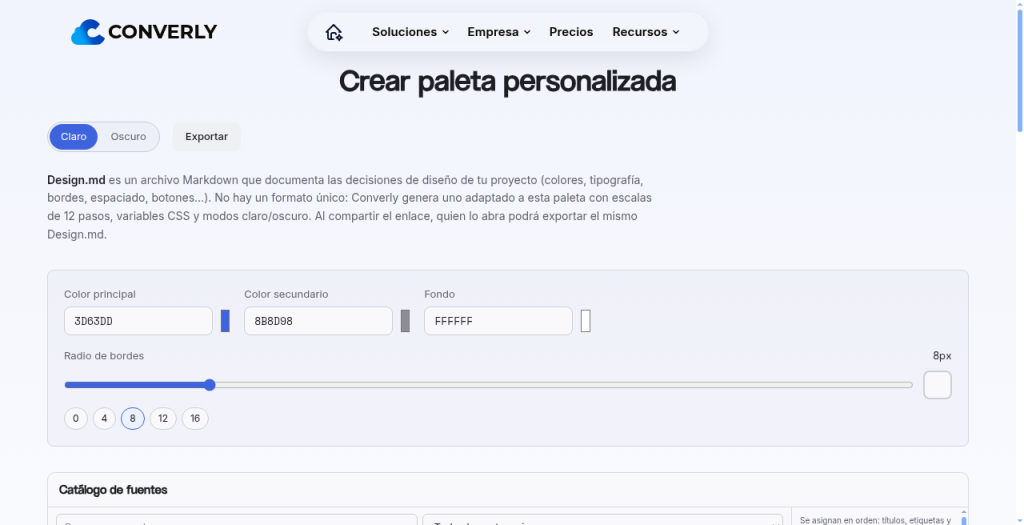
Converly Colors suits small teams already inside the Converly ecosystem who want a lightweight, free way to manage brand color systems without juggling separate tools. Its biggest weakness is near-zero public documentation: feature depth, export formats, and collaboration limits are all unverifiable without an account. Teams that need a proven, standalone color tool with a large community should look at Canva instead.
What is Converly Colors?
Converly Colors is a web-based brand color tool developed by Converly, a software and AI agency based in Barcelona, Spain. It lets teams define and manage custom color palettes intended to keep visual identity consistent across projects, with an emphasis on accessibility in color selection.
The tool is part of Converly's wider product offering, which includes voice AI agents, business automations, and custom software development for SMEs. Converly Colors is available on the web and is listed as free to use, making it a low-barrier option for small teams that want structured brand color management without a dedicated design subscription.
How we scored Converly Colors
Capability scores 12 because only four features can be identified from public information, no export formats or integrations are documented, and named competitors like Canva offer a far more complete and verifiable brand color feature set. Ease of use scores 13 because the tool is web-based and free with no visible onboarding friction, but zero public documentation means a new user has no reference material at all. Value scores 12 because free is genuinely free, which is a real advantage, but the absence of any verifiable feature depth makes it hard to argue the value is meaningful compared to Canva's free tier. Delivery scores 7 because no pricing page content was retrievable, no user reviews or community discussion exist in public search results, and the tool's feature claims cannot be independently verified from any source outside the submitter's own description, which is a significant trust gap for a buyer.
Pros and cons
What we liked
- Free to use with no visible paid tier, making it genuinely zero-cost for teams that just need a shared color reference
- Integrated into the Converly platform, so SME clients already using Converly's other services avoid adding a separate tool subscription
- Accessibility focus is called out explicitly in the product description, which is a concrete design goal that many lightweight palette tools skip
Where it falls short
- No public feature documentation or indexable help content was found, making it impossible to verify export formats, collaboration seat limits, or accessibility check methodology before signing up
- The tool is a sub-module of an agency platform, not a standalone product; its roadmap and update cadence depend on Converly's client services priorities rather than a dedicated product team
- No integrations with design tools such as Figma, Adobe, or any browser extension are mentioned anywhere in the submitted description or discoverable public pages, a gap that dedicated competitors fill as standard
Key features
Who should use Converly Colors?
Small business teams already working with Converly on automations or custom software are the clearest fit. If your company is paying Converly for other services and needs a shared color reference that everyone on the team can access, this tool removes the friction of adopting yet another SaaS product.
Freelance designers or larger brand teams who need export to multiple formats, version history, accessibility audit reports, or Figma integration should look elsewhere. Canva, which is already in this directory, offers a far more documented brand kit feature with proven team collaboration, and it has a free tier that is well understood by millions of users.
Skip it if: Designers who need a mature, well-documented standalone color tool
Converly Colors alternatives
Frequently asked questions
Is Converly Colors actually free, or is there a paid upgrade?+
The submitted pricing model is free, and no paid tier was found in public search results. However, the pricing page could not be retrieved during research, so the existence of any premium plan or usage cap cannot be confirmed or ruled out.
Do I need to be a Converly customer to use it?+
The tool is hosted under the converly.es domain as a sub-path of the main platform. Whether it requires a Converly account or is open to anyone is not stated in any publicly indexed content found during research.
Does it check color contrast for accessibility compliance?+
The product description mentions creating accessible brand color systems, but no specific standard (such as WCAG AA or AAA) or contrast ratio tool is described in any public documentation found.
Can I export palettes to Figma, CSS, or other formats?+
No export formats or design tool integrations are mentioned in the submitted description or any publicly indexed page for this tool. This could not be verified.
How many team members can share a palette?+
No seat limit or collaboration tier information was found in any public source during research. This is a key unknown for teams evaluating the tool.
More AI Design & Art tools
See all categoriesGet your tool listed on 300+ directories.
One listing here is a strong start. But the founders who get discovered everywhere are listed everywhere. Our sister site, Free AI Directories, submits your tool to 300+ AI directories for you, every single one by hand, by a real person.
It is a one-time payment of $49, no subscription, and you can follow along as the submissions land. Prefer the slow route? The same site keeps a free list of 450+ directories you can work through yourself.
Get my tool listed on 300+ directoriesOne-time payment, no subscription · 100% human submissions · Free list of 450+ directories included.