
LayerGrab
AI tool that splits any flat image into up to 16 named, editable layers with background inpainting, for designers and creators.
Are you the maker? Claim this listing to keep info, pricing and screenshots current. Verified via your tool's domain email.
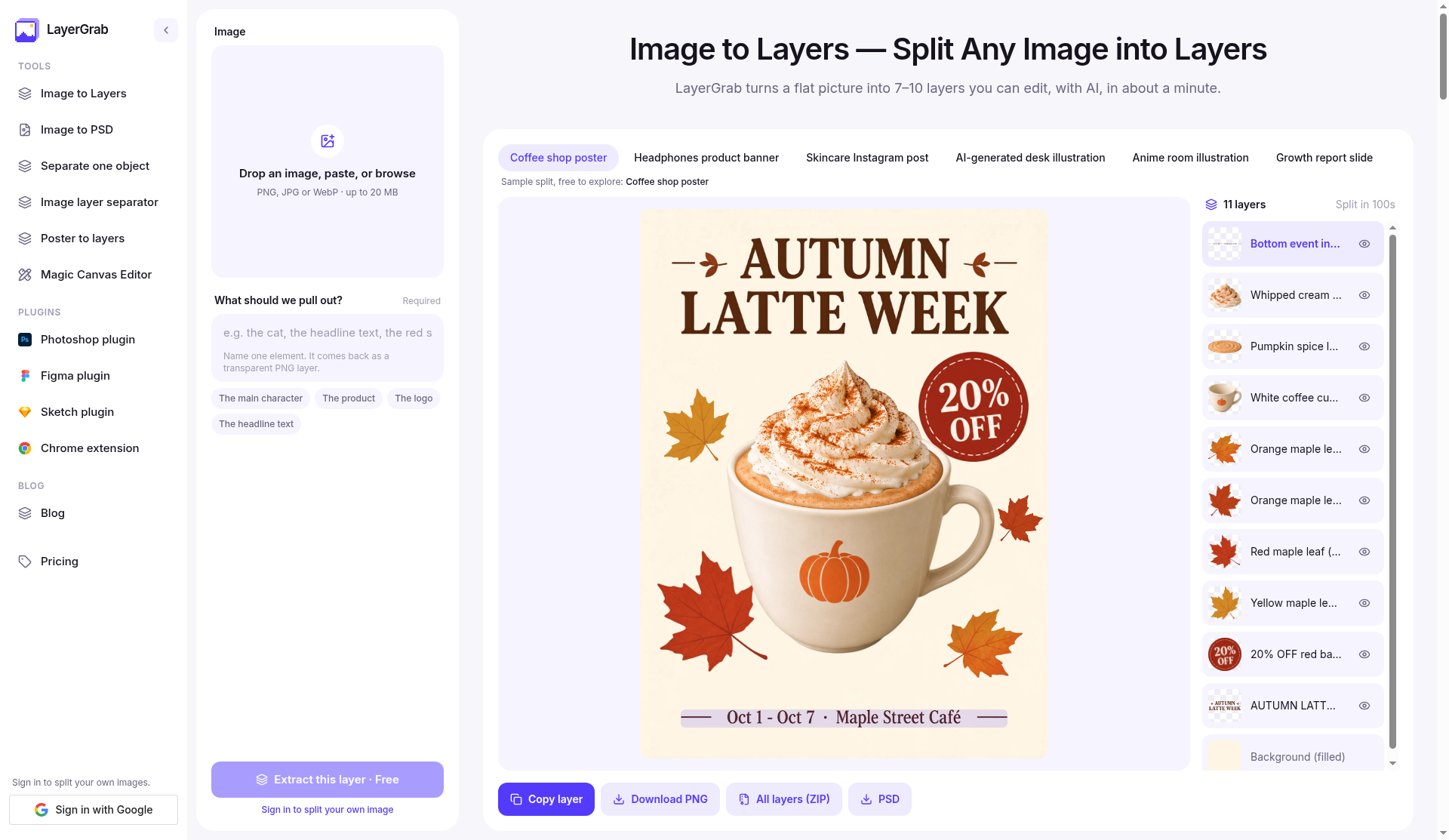
LayerGrab is the right pick for designers who receive flat JPGs, AI-generated posters, or client screenshots and need to pull elements apart without redrawing anything. The per-layer credit model is transparent but adds up fast for high-volume work, and the Basic plan's 120-layer monthly allowance will feel tight for anyone processing more than a dozen images a week. If you need editable text or vector paths rather than rasterized image layers, this tool cannot help you.
What is LayerGrab?
LayerGrab is an AI-powered image decomposition tool that converts flat raster files into stacks of individually named, transparent layers. It accepts PNG, JPG, and WebP images up to 20 MB and returns up to 16 separate elements per image, each on its own layer, with the background area behind extracted objects reconstructed through generative inpainting. Exports are available as individual PNG files, a ZIP archive, or a layered PSD compatible with Photoshop, Photopea, and Affinity Photo.
The tool is available as a web app and through plugins for Photoshop, Figma, Sketch, and Chrome. It is built for graphic designers, marketing professionals, and digital creators who need to work with images when the original layered source file is unavailable, such as AI-generated artwork, client-supplied JPGs, or screenshots. Pricing runs on a credit system charged per layer returned, with monthly subscriptions starting at $12 and one-time credit packs available from $20.
How we scored LayerGrab
Capability scores 18 because the core layer-splitting function is genuinely useful and the background inpainting plus named-layer output are real differentiators, but the hard ceiling of raster-only output with no editable text or vector path is a meaningful gap versus what a designer might expect from a 'layer' workflow. Ease of use scores 20 because the workflow is minimal: upload, wait 60 to 100 seconds, download; the plugin ecosystem and MIT-licensed source code add credibility to the onboarding story. Value scores 15 because the Basic plan's 1,200 monthly credits cover only about 120 layers at $0.10 each, which is a tight allowance for $12/month, and the no-rollover policy means any unused credits in a slow month are simply lost. Delivery scores 15 because the tool is very new (listed on directories in October 2026 with no disclosed funding or user review corpus), making it difficult to assess long-term reliability, and the one-free-split trial is a thin proof point for a credit-based service where costs can accumulate before a user fully understands the per-layer pricing.
Pros and cons
What we liked
- Background inpainting fills reconstructed areas automatically, so extracted elements can be repositioned without leaving transparent holes.
- Plugin source code is MIT-licensed on GitHub, giving technically inclined users full visibility into what the client runs and the ability to self-host the client layer.
- Per-layer credit model means a failed split is refunded in full, and extracting just one named object costs less than a full split.
Where it falls short
- All output layers are rasterized image files; text returns as pixels, not editable type, and there is no vector export path, which is a hard limit no credit tier can fix.
- Subscription credits do not roll over: unused Basic or Premium credits reset every billing month, so a month of lighter use is simply lost.
- The Basic plan's 1,200 monthly credits cover only about 120 layers, which works out to roughly 12 to 17 average splits per month, a ceiling that active designers will hit within the first week.
Key features
LayerGrab pricing
Basic plan is $12/month (1,200 credits, about 120 layers at $0.10 per layer) or $99/year. Premium is $36/month (3,600 credits, about 450 layers at $0.08 per layer) or $299/year. One-time credit packs: $20 for 1,800 credits (about 180 layers) and $60 for 6,600 credits (about 660 layers). Pack credits expire after one year. Every account gets one free split with full download; there is no ongoing free tier.
| Plan | Price | Who it is for |
|---|---|---|
| Free Trial | Free | One free split per account with every layer downloadable as PNG, ZIP, or PSD. No ongoing free credits after the first split. |
| Basic (monthly) | $12/mo | 1,200 credits per month, covering about 120 layers at $0.10 per layer. Includes web app and all plugins, plus PNG, ZIP, and PSD export. Credits reset monthly and do not roll over. |
| Basic (yearly) | $99/yr | Same 1,200 credits added each month as the monthly Basic plan, billed once annually. Saves 31% versus monthly billing. |
| Premium (monthly) | $36/mo | 3,600 credits per month, covering about 450 layers at $0.08 per layer. Lower per-layer cost than Basic. Includes web app and all plugins, plus PNG, ZIP, and PSD export. |
| Premium (yearly) | $299/yr | Same 3,600 monthly credits as the monthly Premium plan, billed once annually. Saves 31% versus monthly billing. |
| Credit Pack - 1,800 credits | $20 | 1,800 one-time credits covering about 180 layers at $0.10 per layer. No subscription required. Credits expire one year after purchase. |
| Credit Pack - 6,600 credits | $60 | 6,600 one-time credits covering about 660 layers at roughly $0.09 per layer. No subscription required. Credits expire one year after purchase. |
Pricing reflects what we saw at time of review (2026-10). Always confirm current pricing on the tool's own site.
Who should use LayerGrab?
A freelance designer who regularly receives flat JPGs from clients and needs to isolate a logo, swap a background, or reposition a product without going back to the client for source files will get real value here. The same applies to social media managers who work with AI-generated images and need to pull a headline or product onto its own layer for a quick resize or color adjustment. The one-free-split trial is enough to test whether the AI handles your typical image type before committing to a plan.
If you process more than 20 to 30 images a month, the Basic plan's roughly 120-layer allowance will run out fast and the Premium plan at $36/month may be the realistic entry point. Anyone who needs to edit the actual text content of an image, or who works primarily with vector artwork, should look elsewhere. Canva, which is already in our directory, covers a much broader design workflow including text editing and template-based creation, and is a better fit if layer extraction is only one small part of what you need.
Skip it if: Anyone needing editable text, vector paths, or high-volume batch processing on a budget
Frequently asked questions
Is there a free plan or ongoing free credits?+
No ongoing free tier exists. Every account gets exactly one free split with all layers downloadable. After that, the cheapest entry point is a $20 one-time credit pack covering about 180 layers.
What file types and sizes does LayerGrab accept?+
It accepts PNG, JPG, and WebP files up to 20 MB. It does not accept vector formats like SVG or AI files.
Do the layers come back as editable text or vectors?+
No. Every layer is a rasterized PNG image. Text returns as a pixel layer you can move or mask, not a string you can retype. There is no vector export.
How long are split results stored?+
Results are kept for 30 days, then permanently deleted. You need to download your layers, ZIP, or PSD before that window closes. Your credit and split history stays in your account indefinitely.
Do unused subscription credits carry over to the next month?+
No. Subscription credits reset at the start of each billing month. Credit pack credits are separate and expire one year after purchase.
Can I use LayerGrab inside Figma or Photoshop without opening the website?+
Yes. Plugins exist for Figma, Photoshop, and Sketch, and a Chrome extension lets you right-click any image on any webpage to split it. All plugins use your LayerGrab account credits. The plugin source code is MIT-licensed and publicly available on GitHub.
More AI Design & Art tools
See all categoriesGet your tool listed on 300+ directories.
One listing here is a strong start. But the founders who get discovered everywhere are listed everywhere. Our sister site, Free AI Directories, submits your tool to 300+ AI directories for you, every single one by hand, by a real person.
It is a one-time payment of $49, no subscription, and you can follow along as the submissions land. Prefer the slow route? The same site keeps a free list of 450+ directories you can work through yourself.
Get my tool listed on 300+ directoriesOne-time payment, no subscription · 100% human submissions · Free list of 450+ directories included.