
QuizFromText
A no-account-required web tool that turns pasted text into multiple-choice quizzes and flashcards using AI.
Are you the maker? Claim this listing to keep info, pricing and screenshots current. Verified via your tool's domain email.
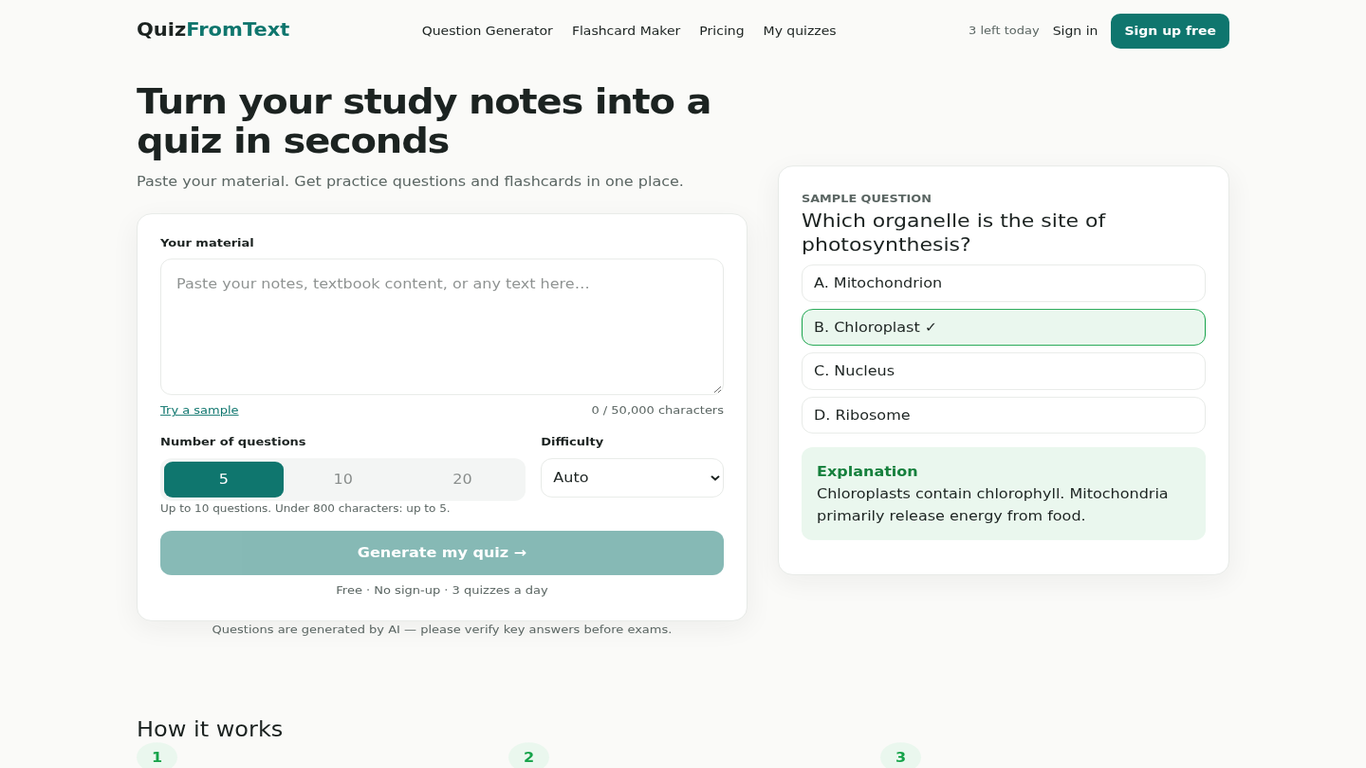
QuizFromText is the right pick for a student or solo teacher who wants to paste notes and get a practice quiz in under a minute, no sign-up required. The free tier caps you at 3 generations per day and 5,000 characters per quiz, and the Pro plan still lacks Anki/CSV export (listed as 'coming later'), which puts it behind more established quiz tools for anyone who needs LMS integration. If you need to distribute quizzes to a class, embed them in a course platform, or export to Anki today, look elsewhere.
What is QuizFromText?
QuizFromText is a web-based AI quiz generator that converts pasted text into multiple-choice questions and flashcards. Users paste their source material, and the tool produces a ready-to-practice quiz without requiring an account. It supports copy, print, and PDF export on both its free and paid tiers.
The tool is aimed at students, teachers, and trainers who want to turn their own notes or reading material into self-study aids. The free plan allows 3 quiz generations per day with inputs up to 5,000 characters. The Pro plan, available monthly or annually, raises the daily generation limit to 300 and the character cap to 50,000, and is planned to support up to 50 questions per quiz.
How we scored QuizFromText
Ease of use is the tool's genuine strength: no account, no setup, paste and go, which earns a high sub-score there. Capability is limited by the absence of Anki/CSV export (listed as 'coming later'), no API, no integrations, and a question-type range that appears to be primarily multiple-choice, putting it behind more capable quiz platforms. Value is reasonable at $6 to $9/month for Pro, but the free tier's 5,000-character cap and 3-generation daily limit are tight enough that many real study sessions will hit them, and the Pro plan is still missing a promised feature. Delivery scores low because no user sentiment data was findable, the tool is new enough to have no track record, and two features advertised on the Pro tier (Anki/CSV export, 50-question limit) are explicitly marked as not yet available, meaning the paid plan does not fully deliver what the pricing page implies.
Pros and cons
What we liked
- No account required to generate and practice quizzes, which removes the single biggest friction point for casual study use.
- Pro plan at $6/month (annual) or $9/month is priced well below most AI quiz platforms that offer comparable generation limits.
- Both tiers include flashcard mode and copy/print/PDF export, so the free plan is not a stripped-down demo.
Where it falls short
- Anki and CSV export are listed as 'coming later' and are absent from both tiers today, making QuizFromText a dead end for anyone who relies on spaced-repetition apps or LMS imports.
- The free tier's 5,000-character input cap is tight: a single dense lecture slide deck or a medium-length article will hit it quickly, forcing either truncation or an upgrade.
- The tool is web-only with no API, no browser extension, no mobile app, and no integrations, so it cannot fit into any existing workflow beyond copy-paste.
Key features
QuizFromText pricing
Free tier: $0, 3 quiz generations per day, up to 5,000 characters and 10 questions per quiz. Pro tier: $9/month (or $72/year, equivalent to $6/month billed annually), 300 generations per day soft limit, up to 50,000 characters and 50 questions per quiz. Anki/CSV export is not yet available on any tier.
| Plan | Price | Who it is for |
|---|---|---|
| Free | $0 | 3 quiz generations per day, up to 5,000 characters per quiz, up to 10 questions per quiz (up to 5 for inputs under 800 characters), flashcards, copy/print/PDF export, saved history with account. No Anki or CSV export. |
| Pro | $9/month | 300 generations per day (soft limit), up to 50,000 characters per quiz, up to 50 questions per quiz (planned), flashcards, copy/print/PDF export, saved history with account. Anki/CSV export listed as coming later. Annual billing available at $72/year ($6/month equivalent). 7-day refund window. |
Pricing reflects what we saw at time of review (2026-11). Always confirm current pricing on the tool's own site.
Who should use QuizFromText?
A student cramming from lecture notes or a textbook chapter is the clearest fit: paste the text, get 10 questions, practice immediately, no account needed. Solo teachers who want to generate a quick formative check from a reading passage will also find the free tier genuinely useful for light, occasional use.
Anyone running a structured course, managing a team of trainers, or needing to push quizzes into Anki, a CSV, or an LMS should look elsewhere right now. Notion AI is a better fit if your content already lives in Notion and you want AI-assisted study materials inside your existing workspace. For heavier quiz distribution and class management, a dedicated platform like Quizgecko (which QuizFromText itself names as a competitor) or a tool with active LMS export will serve you better.
Skip it if: Teams, LMS users, or anyone who needs Anki/CSV export or quiz distribution features right now.
QuizFromText alternatives
Frequently asked questions
Do I need to create an account to use QuizFromText?+
No. You can generate quizzes and practice without signing up. An account is only needed to save quiz history to a server; without one, sessions are stored locally on your device.
How many quizzes can I generate for free?+
The free tier allows 3 quiz generations per day, with a daily reset time shown in your local timezone. Each quiz can use up to 5,000 characters of input and produce up to 10 questions.
What does the Pro plan cost and what does it add?+
Pro costs $9/month or $72/year (equivalent to $6/month). It raises the daily generation limit to 300, the input cap to 50,000 characters, and the question limit to up to 50 per quiz.
Can I export quizzes to Anki or as a CSV file?+
Not yet. Anki and CSV export are listed as planned features on the pricing page but are not available on either the free or Pro tier as of the review date.
Is there a refund policy?+
Yes. QuizFromText offers a 7-day refund window. Refund requests must be sent to support@quizfromtext.com.
What question types does QuizFromText generate?+
The pricing page and site copy focus on multiple-choice questions. The submitted description mentions 'multiple-choice and other question types,' but the live pricing page does not enumerate additional types explicitly.
More AI Productivity Tools
See all categoriesGet your tool listed on 300+ directories.
One listing here is a strong start. But the founders who get discovered everywhere are listed everywhere. Our sister site, Free AI Directories, submits your tool to 300+ AI directories for you, every single one by hand, by a real person.
It is a one-time payment of $49, no subscription, and you can follow along as the submissions land. Prefer the slow route? The same site keeps a free list of 450+ directories you can work through yourself.
Get my tool listed on 300+ directoriesOne-time payment, no subscription · 100% human submissions · Free list of 450+ directories included.