
RemoveMate
Browser-based AI background remover with a no-signup free tier and one-time credit packs for occasional image cleanup.
Are you the maker? Claim this listing to keep info, pricing and screenshots current. Verified via your tool's domain email.
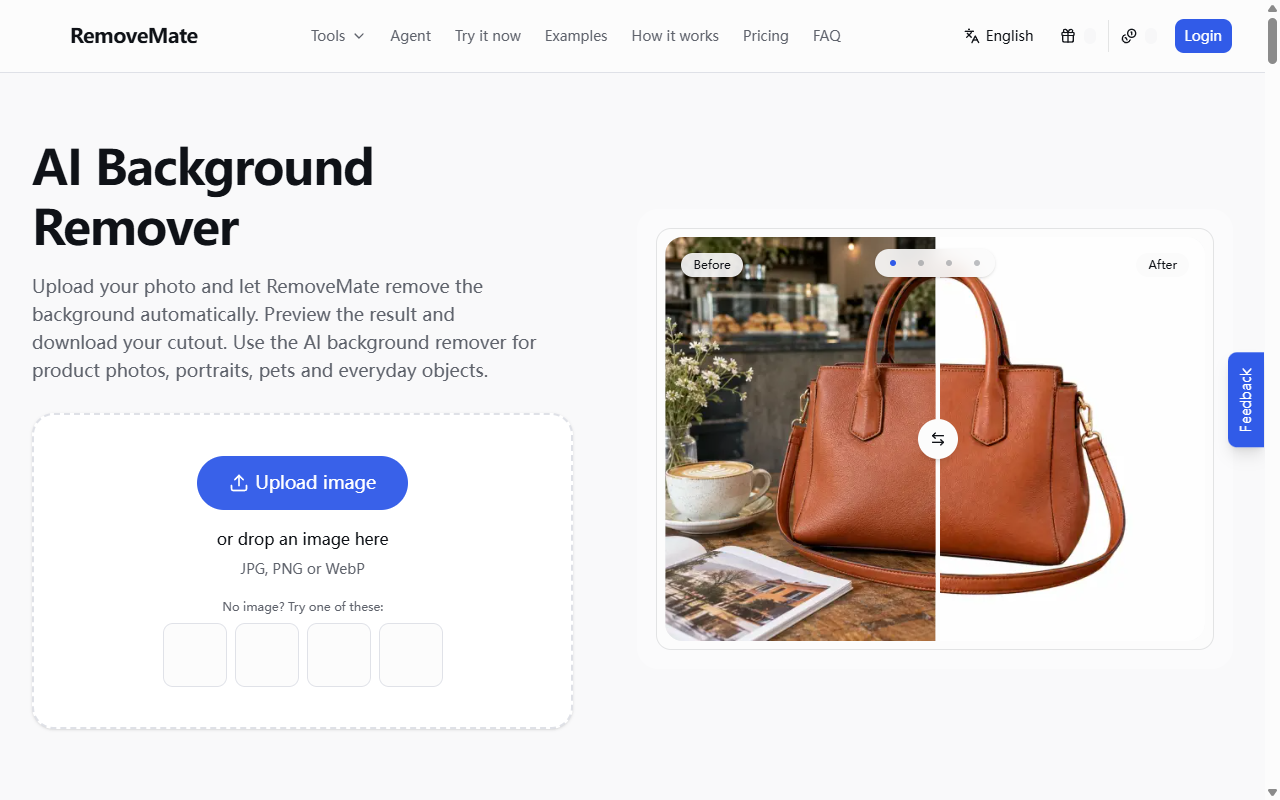
RemoveMate is the right pick for someone who needs a quick, no-account background removal a few times a week and does not want a subscription. Its one-time credit packs are genuinely buyer-friendly, but the tool set is narrow: no background replacement, no batch processing, and no API, which puts it well behind Canva for anyone doing volume work. If you need more than occasional cleanup, look elsewhere.
What is RemoveMate?
RemoveMate is a browser-based AI image cleanup tool that automatically removes backgrounds from product photos, portraits, and pet images. Users upload a JPG, PNG, or WebP file, the AI processes it without any manual selection, and a preview slider lets them inspect the cutout before downloading. Additional tools on the site handle watermark removal, text erasure, and image unblurring.
The tool runs entirely in the browser with no installation or account required. It uses a credit-based freemium model: 10 free credits reset each week, with optional one-time packs of 100 or 250 credits available for purchase. It is primarily used by ecommerce sellers, social media managers, and individuals who need clean product or portrait cutouts without learning a full image editor.
How we scored RemoveMate
Ease of use scores high because the no-login, no-prompt workflow is genuinely frictionless and the before-and-after slider is a practical touch. Value is strong for occasional users: $9 for 100 non-expiring credits undercuts any monthly subscription for light workloads. Capability is limited by the absence of background replacement, batch processing, and API access, features that named competitors like Canva include, keeping this score in the mid-teens. Delivery takes the biggest hit: the tool launched in September 2026, has zero published user reviews in search results, is run by a solo founder with no disclosed funding, and one third-party source contradicts the live pricing page on the free-tier reset cadence, all of which make it impossible to score delivery with confidence above the single digits.
Pros and cons
What we liked
- Genuinely no-friction free tier: 10 credits per week with no account or card required, usable immediately.
- One-time credit packs with no expiry ($9 for 100 credits, $19 for 250) make it cheaper than any monthly subscription for occasional users.
- Handles fine edge detail explicitly: the site calls out hair, fur, straps, flower stems, and object outlines as target cases, and the before-and-after slider lets you verify before downloading.
Where it falls short
- No background replacement or compositing: RemoveMate only removes backgrounds, it does not let you drop in a new one, which means a second tool is always required for finished product images.
- No batch processing: credits are consumed one image at a time with no bulk upload, making it impractical for catalog-scale work even if you buy the 250-credit pack.
- Thin track record: the tool launched in September 2026, has no published user reviews in search results, and is run by a solo founder, so reliability and longevity are unverified.
Key features
RemoveMate pricing
Free tier gives 10 credits per week with no sign-up or card required. Paid options are one-time purchases: 100 credits for $9 (about $0.09 per credit) or 250 credits for $19 (about $0.076 per credit). No subscription, no expiry on purchased credits. Payments handled by Stripe with a 7-day refund policy on unused packs.
| Plan | Price | Who it is for |
|---|---|---|
| Free | $0 | 10 credits per week, no sign-up required, no credit card required. Works across all tools on the site. |
| Starter | $9 | 100 credits, one-time purchase, no subscription. Credits never expire. Approximately $0.09 per credit. |
| Project | $19 | 250 credits, one-time purchase, no subscription. Credits never expire. Approximately $0.076 per credit. |
Pricing reflects what we saw at time of review (2026-11). Always confirm current pricing on the tool's own site.
Who should use RemoveMate?
A solo Etsy or Shopify seller who photographs products at home and needs clean cutouts a few times a week will get real value here. The free weekly credits cover light use at zero cost, and a $9 one-time pack handles a product launch batch without committing to a monthly bill. The no-login flow also suits someone who just landed on the page from a search and wants a result in under a minute.
Anyone running a design agency, managing a catalog of hundreds of SKUs, or needing to swap backgrounds rather than just remove them should look elsewhere. Canva, which is already in our directory, includes background removal inside a full design environment with templates, brand kits, and direct export to social formats. If your workflow goes beyond cutting out a subject and into placing it somewhere new, Canva covers that ground and RemoveMate does not.
Skip it if: Teams or power users who need batch processing, background replacement, or API access.
RemoveMate alternatives
Frequently asked questions
Do I need to create an account to use RemoveMate?+
No. The free tier requires no sign-up and no credit card. You can upload a photo and download the result immediately.
How much does RemoveMate cost?+
The free tier gives 10 credits per week at no cost. Paid packs are one-time purchases: 100 credits for $9 or 250 credits for $19. There is no monthly subscription.
Do purchased credits expire?+
No. Credits bought in either paid pack never expire, so you can use them at your own pace.
What image formats does RemoveMate support?+
The tool accepts JPG, PNG, and WebP files and outputs a transparent PNG after background removal.
Can RemoveMate replace a background with a new one?+
No. RemoveMate removes backgrounds and outputs a transparent cutout. Adding a new background requires a separate tool such as Canva.
What other tools does RemoveMate include besides background removal?+
The site also offers a watermark remover, a text eraser, and an image unblur tool. All tools draw from the same credit balance.
More AI Design & Art tools
See all categoriesGet your tool listed on 300+ directories.
One listing here is a strong start. But the founders who get discovered everywhere are listed everywhere. Our sister site, Free AI Directories, submits your tool to 300+ AI directories for you, every single one by hand, by a real person.
It is a one-time payment of $49, no subscription, and you can follow along as the submissions land. Prefer the slow route? The same site keeps a free list of 450+ directories you can work through yourself.
Get my tool listed on 300+ directoriesOne-time payment, no subscription · 100% human submissions · Free list of 450+ directories included.