
Image2Layers
AI tool that splits flat JPG, PNG, or WebP images into up to 8 editable PSD layers, no Photoshop skills required.
Are you the maker? Claim this listing to keep info, pricing and screenshots current. Verified via your tool's domain email.
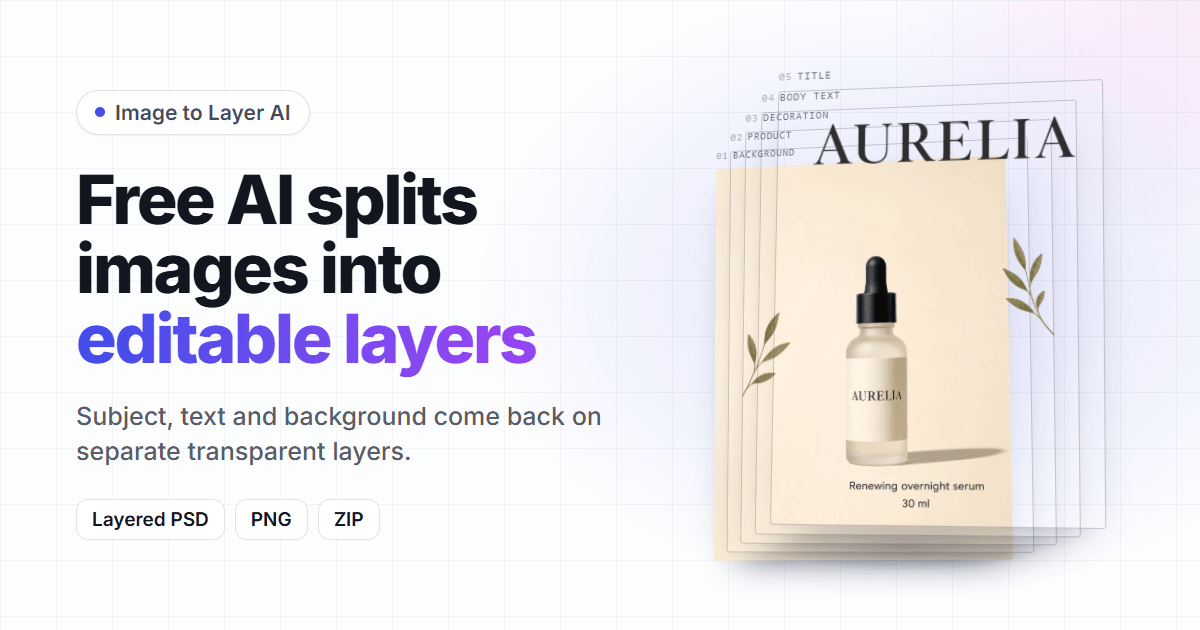
Image2Layers is the right pick for designers and e-commerce teams who regularly need to pull objects, text, and backgrounds out of flat images without touching a masking tool. The layer cap of 8 and the 30-day expiry on credit packs are real constraints, and Canva's Magic Studio covers simpler background-removal needs at a lower entry cost. Anyone who only occasionally needs a single subject cut out should skip the subscription entirely and look at Canva instead.
What is Image2Layers?
Image2Layers is a web-based AI tool that separates flat JPG, PNG, or WebP images into transparent, editable layers and delivers the result as a layered PSD file, individual PNG layers, or a ZIP archive. It runs the open Qwen-Image-Layered model in the cloud, so no local GPU or image-editing software is needed. Subscriptions allow up to 8 layers per run; one-time credit packs are capped at 4.
The service also includes a set of free browser utilities: converting any image to a single-layer PSD, converting PSD files to PNG, JPG, or PDF, and viewing PSD files online without Photoshop. A Layer Agent chat interface lets users split individual layers further within the same session. The tool targets designers, freelancers, and e-commerce teams who work with product photography or AI-generated images and need editable layer files without manual masking.
How we scored Image2Layers
Capability lands at 19 because the tool does its specific job (AI layer separation to layered PSD with inpainting behind removed objects) better than any general-purpose design tool in the directory, but the hard 8-layer ceiling and absence of any API access are real feature gaps for production workflows. Ease of use scores 20 because the browser-only, no-install approach with a chat-based Layer Agent and free utility tools keeps friction low for the target user. Value drops to 14: the $14.90/month Starter covers only about 37 runs per month, there is no free tier to evaluate the output quality before committing, and the 30-day expiry plus 4-layer cap on credit packs actively penalizes irregular users who need the full feature set. Delivery sits at 15 because no independent user reviews or third-party sentiment data could be found for this specific tool, making it impossible to verify that the AI output quality matches the marketing claims; the score reflects genuine uncertainty rather than confirmed problems.
Pros and cons
What we liked
- Runs the Qwen-Image-Layered model hosted, so no local GPU, ComfyUI, or Photoshop installation is needed to get a layered PSD from any flat image.
- Failed runs are refunded automatically, and re-downloads are free, which removes the sting of a bad AI split on an expensive credit pack.
- Free browser tools (image-to-PSD, PSD-to-PNG/JPG/PDF, online PSD viewer) are genuinely no-account-required and add real utility beyond the paid core.
Where it falls short
- Credit packs expire after 30 days and are hard-capped at 4 layers per run, forcing irregular users who need the full 8-layer depth onto a monthly subscription they may not fill.
- No API access is documented at any tier, which rules out any automated or batch pipeline integration without manual browser sessions.
- The 8-layer ceiling per run is a fixed limit across all subscription tiers; complex scenes with many distinct objects simply cannot be split further in a single pass, requiring multiple chained runs and additional credit spend.
Key features
Image2Layers pricing
No free tier. Subscriptions run $14.90/month (Starter, ~30 runs/month), $24.90/month (Pro, ~80 runs/month), and $59.90/month (Studio, ~250 runs/month). Yearly billing cuts those to $9.90, $14.90, and $35.90/month respectively. One-time credit packs are available from $1.99 (2 runs) to $29.90 (70 runs), but pack credits expire after 30 days and are capped at 4 layers per run versus 8 on subscriptions.
| Plan | Price | Who it is for |
|---|---|---|
| Starter (monthly) | $14.90/mo | 450 runs per year delivered monthly (~37 runs/month), 4,500 credits at $0.26 per run. Up to 8 layers per run, PSD/PNG/ZIP export, Layer Agent chat included. |
| Starter (yearly) | $118.80/yr | Same 450 runs per year as monthly Starter, billed as one payment. Effective rate drops to $9.90/month. |
| Pro (monthly) | $24.90/mo | 1,100 runs per year delivered monthly (~92 runs/month), 11,000 credits at $0.16 per run. Up to 8 layers per run, PSD/PNG/ZIP export, Layer Agent chat included. |
| Pro (yearly) | $178.80/yr | Same 1,100 runs per year as monthly Pro, billed as one payment. Effective rate drops to $14.90/month. |
| Studio (monthly) | $59.90/mo | 3,000 runs per year delivered monthly (~250 runs/month), 30,000 credits at $0.14 per run. Up to 8 layers per run, PSD/PNG/ZIP export, Layer Agent chat included. |
| Studio (yearly) | $430.80/yr | Same 3,000 runs per year as monthly Studio, billed as one payment. Effective rate drops to $35.90/month. |
| Credit Pack - 20 credits | $1.99 | 2 runs, one-time payment. Credits expire after 30 days. Capped at 4 layers per run (not 8). $1.00 per run. |
| Credit Pack - 80 credits | $4.90 | 8 runs, one-time payment. Credits expire after 30 days. Capped at 4 layers per run. $0.61 per run. |
| Credit Pack - 200 credits | $9.90 | 20 runs, one-time payment. Credits expire after 30 days. Capped at 4 layers per run. $0.50 per run. |
| Credit Pack - 700 credits | $29.90 | 70 runs, one-time payment. Credits expire after 30 days. Capped at 4 layers per run. $0.43 per run. |
Pricing reflects what we saw at time of review (2026-11). Always confirm current pricing on the tool's own site.
Who should use Image2Layers?
A product photographer preparing dozens of SKU images for an e-commerce catalog will get the most out of Image2Layers. The Pro plan at $24.90/month covers roughly 80 runs, which maps well to a steady weekly batch. Freelance designers who receive flat AI-generated artwork from clients and need to hand back an editable PSD are another natural fit, since the Layer Agent chat lets them refine individual regions without starting over.
Anyone who just needs a subject cut from a background once in a while should not pay $14.90/month for the Starter plan. Canva's Magic Studio handles background removal as part of its existing subscription, and for that single-layer use case it is faster and cheaper. Similarly, if your workflow demands more than 8 layers per image or requires batch API processing, Image2Layers has no documented API access, so you would need to look elsewhere.
Skip it if: Casual users who only need basic background removal; Canva covers that for less
Image2Layers alternatives
Frequently asked questions
Is there a free trial or free tier?+
There is no free tier and no trial period listed on the pricing page. The cheapest entry point is a $1.99 credit pack covering 2 runs, capped at 4 layers per run.
How many layers can I get per image?+
Subscription plans (Starter, Pro, Studio) allow up to 8 layers per run. One-time credit packs are hard-capped at 4 layers per run regardless of which pack you buy.
Do credits roll over if I do not use them all in a month?+
Subscription credits are delivered monthly and last the billing month; unused credits do not roll over. Credit pack credits expire 30 days after purchase.
Can Image2Layers recover the original layers from a flattened PSD or JPG?+
No. The AI infers plausible layer separations from the flat image; it does not reconstruct original source layers. The site states this clearly in its FAQ.
What happens to my uploaded images?+
Uploaded images and generated layer files are deleted automatically 30 days after upload on every plan. You can request earlier deletion by emailing from your account address.
Is there an API for batch or automated processing?+
No API access is documented on the site at any tier. All processing happens through the browser interface, which limits automated or high-volume pipeline use.
More AI Design & Art tools
See all categoriesGet your tool listed on 300+ directories.
One listing here is a strong start. But the founders who get discovered everywhere are listed everywhere. Our sister site, Free AI Directories, submits your tool to 300+ AI directories for you, every single one by hand, by a real person.
It is a one-time payment of $49, no subscription, and you can follow along as the submissions land. Prefer the slow route? The same site keeps a free list of 450+ directories you can work through yourself.
Get my tool listed on 300+ directoriesOne-time payment, no subscription · 100% human submissions · Free list of 450+ directories included.